
Live · Android

Contact Help
An emergency contact app with big buttons — call family in one tap, and one press of “Help!” sends an urgent text, with your location if you choose, to the whole family.
What it is
Contact Help is an emergency contact app you set up on your parents’ phone. In an emergency, one press of the “Help!” button texts everyone in the family you registered to ask for help, and calls the first person to contact right away.
What you can do
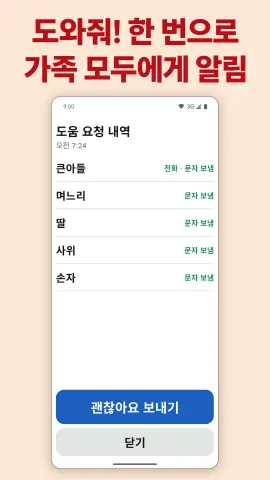
- Help! — Texts the whole family that your parent has asked for help, and calls one key contact on speakerphone right away. If you like, it also sends a map link to where they are now. After the call it shows who was told, and “I’m OK” lets the family know they are fine.
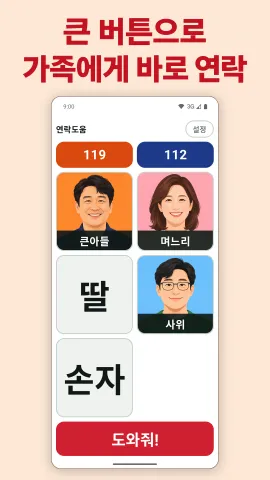
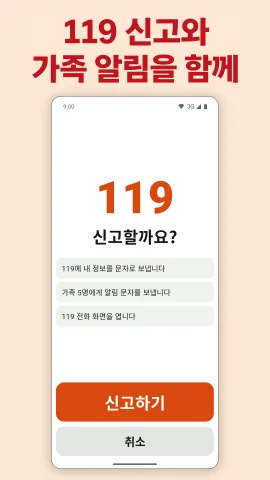
- 119 · 112 reports — Tap 119 (fire and ambulance) or 112 (police), Korea’s emergency numbers, at the top of the screen and confirm once more with “Report”. The app texts the name, age and address you saved and opens the phone screen, and lets the family know at the same time.
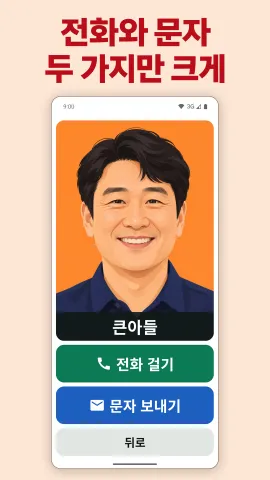
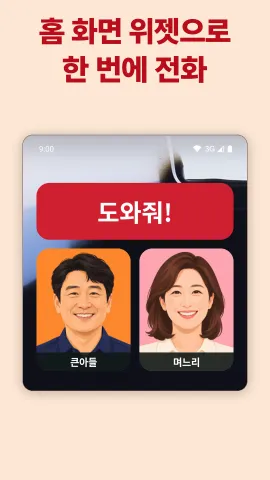
- Big buttons — Family members such as “eldest son” or “daughter-in-law” appear as big tiles. Tap a tile and only two big choices appear, Call and Text — or set it to call the moment it is tapped.
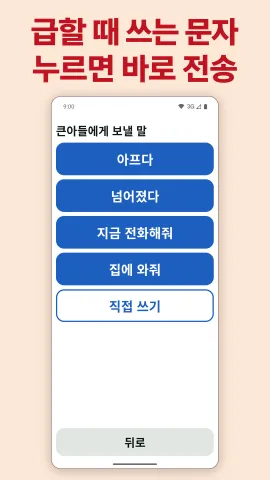
- Prepare texts for urgent moments, like “I’m not feeling well” or “Call me now”, and send one with a single tap. You can also type or dictate a message.
- Home screen widgets — Put one family member on the home screen and a tap calls them at once. There are Help!, 119 and 112 widgets, too.
- Set up by the family — The first launch walks you through setup step by step. A picture guide is read aloud, and you can lock the settings so nothing changes by mistake.
Good to know
- No sign-up or login. Contacts, photos and personal details are stored only on the phone and are not sent to the developer.
- Texts are sent only when a button is pressed, and only to the registered numbers and to 119 and 112. Location is sent with help requests and reports only when “Send my location” is on.
- There is a banner ad at the top of the screen, and after a long period of use an ad also appears in the exit dialog. A monthly subscription removes the ads.
- Texts may be charged depending on the phone plan.
- Text reports to 119 and 112 can arrive late depending on the network. In an emergency, always call as well.
- The app’s screens are in Korean. It is an Android app, available on Google Play.
Who it’s for
Families who want their parents to be able to reach them with a single button in an emergency.